
Secure Vault - Hide Private Photo Video1.02 - App Store
You'll be able to see results in few seconds.
Publisher Description
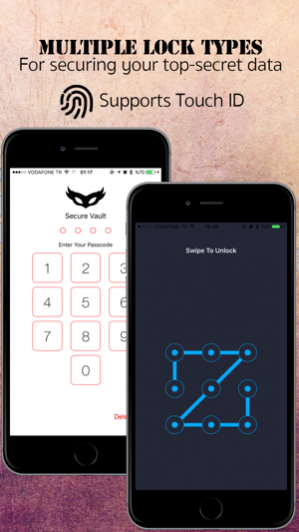
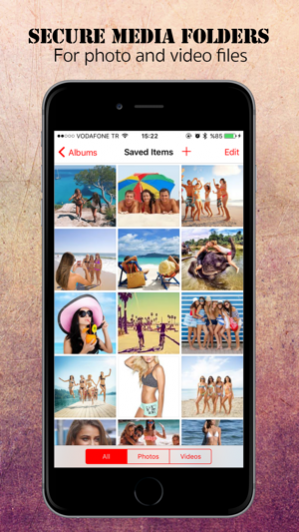
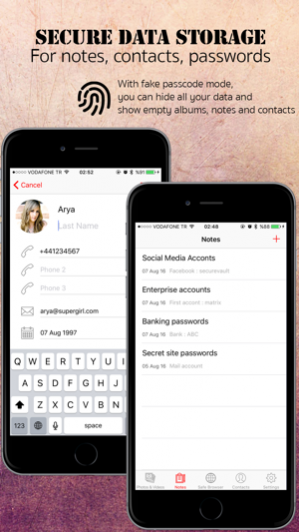
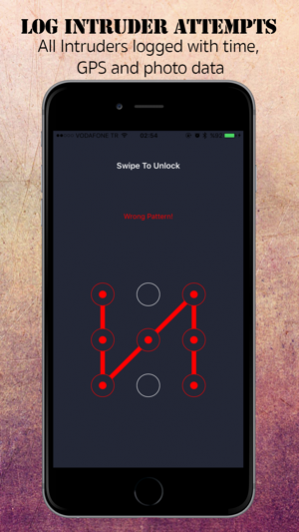

With Secure Vault App, it is now possible to protect your secrets in private secure folders inside the app with pass code protection (Touch ID is also supported). Secure and hide your very secret private pics, videos, notes and contacts inside Secure Vault.
MEDIA ALBUMS
- You can create as many albums as you want and import your photos, videos inside that albums to protect, hide and secure them inside Secure Vaults
- You can export your media whenever you want again back to ios Photos App
- You can take private photos via in app camera module just inside your Secure Vault.
- You can move your medias from album to album easily just with a few taps
FAKE PASSCODE MODE
- You can create fake passcode via settings tab and if anyone or you type that passcode, application shows empty album, notes and contacts.
- In fake passcode mode you can also create albums which can only be seen when logged in with fake passcode. (All your secret albums, notes and contacts will remain hidden untill you login with normal passcode)
-And also if you login with fake passcode Settings Tab will hide itself until you login with normal passcode.
PRIVATE BROWSER
- You can browse privately and browsing history will remain inside your Secure Vault.
- You can download any image with the help of private browser just with a long tap into your Secure Vault Albums.
NOTES & CONTACTS
- You can take your notes, hide private and secret data, password etc. inside your Secure Vault easily just by tapping Notes tab via built-in notes module.
- Also you can import and hide or create new contacts inside your Secure Vault via built-in contact manager.
INTRUDER ATTEMPT & SUCCESFULL LOGIN LOGS
- All wrong password attempts are logged in intruder logs with intruder Photo, GPS location data, intruder attempt time and also shown on map with a pin attached at intruder attempt location.
- Also intruder break-in attempt count shown on badge number till succesfull login occurs.
- Also all succesfull logins can be logged inside built-in security log module.
NOTE :
- All your data, photos and videos are stored in the application. Before deleting Secure Vault App, do not forget to backup your data.
- You will be asked to delete imported photos or videos from your camera roll. If you select not to delete, you need to delete them later from camera roll manually
Disclaimer : Secure Vault App locks your private data inside the app with a passcode you provided. Our app is not designed to lock your device entirely.
Sep 21, 2016 Version 1.02
-Turkish language support added.
-IOS 10 contacts permission bug fixed.
-IOS 10 Photo permission bug fixed.
About Secure Vault - Hide Private Photo Video
The company that develops Secure Vault - Hide Private Photo Video is Hakan Cakiroglu. The latest version released by its developer is 1.02.
To install Secure Vault - Hide Private Photo Video on your iOS device, just click the green Continue To App button above to start the installation process. The app is listed on our website since 2016-09-21 and was downloaded 0 times. We have already checked if the download link is safe, however for your own protection we recommend that you scan the downloaded app with your antivirus. Your antivirus may detect the Secure Vault - Hide Private Photo Video as malware if the download link is broken.
How to install Secure Vault - Hide Private Photo Video on your iOS device:
- Click on the Continue To App button on our website. This will redirect you to the App Store.
- Once the Secure Vault - Hide Private Photo Video is shown in the iTunes listing of your iOS device, you can start its download and installation. Tap on the GET button to the right of the app to start downloading it.
- If you are not logged-in the iOS appstore app, you'll be prompted for your your Apple ID and/or password.
- After Secure Vault - Hide Private Photo Video is downloaded, you'll see an INSTALL button to the right. Tap on it to start the actual installation of the iOS app.
- Once installation is finished you can tap on the OPEN button to start it. Its icon will also be added to your device home screen.
Program Details
System requirements
Download information
Pricing
Version History
version 1.02
posted on 2016-09-21
Sep 21, 2016 Version 1.02
-Turkish language support added.
-IOS 10 contacts permission bug fixed.
-IOS 10 Photo permission bug fixed.
version 1.02
posted on 2016-09-04
version 1.02
posted on 1970-01-01
2016年9月21日 Version 1.02
-Turkish language support added.
-IOS 10 contacts permission bug fixed.
-IOS 10 Photo permission bug fixed.
version 1.02
posted on 1970-01-01
21 вер 2016 р. Version 1.02
-Turkish language support added.
-IOS 10 contacts permission bug fixed.
-IOS 10 Photo permission bug fixed.
Disclaimer
Official App Store Link
We do not host Secure Vault - Hide Private Photo Video on our servers. We did not scan it for viruses, adware, spyware or other type of malware. This app is hosted by Apple and passed their terms and conditions to be listed there. We recommend caution when installing it.
The App Store link for Secure Vault - Hide Private Photo Video is provided to you by apps112.com without any warranties, representations or guarantees of any kind, so access it at your own risk.
If you have questions regarding this particular app contact the publisher directly. For questions about the functionalities of apps112.com contact us.
